

In today’s dynamic and increasingly remote work environments, the need for seamless collaboration tools has never been greater. Introducing virtual whiteboards, a game-changing solution designed to bridge geographical gaps and empower teams to brainstorm, strategize, and visualize ideas together in real-time. This article delves into the core features and significant advantages of utilizing virtual whiteboards, showcasing how they can revolutionize teamwork and boost productivity across various industries and organizational structures.
From Fortune 500 companies to small startups and even educational institutions, organizations worldwide are adopting virtual whiteboards to enhance team collaboration and drive innovation. These digital canvases offer a shared space where individuals can contribute equally, regardless of their location. We will explore how virtual whiteboards facilitate more engaging meetings, improve project management workflows, and foster a more inclusive and creative environment. By understanding the power of these collaborative platforms, businesses can unlock new levels of efficiency and achieve unparalleled success in the modern, interconnected world.
What is a Virtual Whiteboard and How Does It Work?
A virtual whiteboard, also known as an online whiteboard, is a collaborative digital workspace that simulates the functionality of a physical whiteboard. It allows multiple users to simultaneously create, share, and interact with visual content in real-time, regardless of their physical location.
Essentially, it’s a software application that provides a shared digital canvas. Users can add elements such as text, images, shapes, and freehand drawings. These elements can be manipulated, moved, and edited by any authorized participant, fostering a dynamic and interactive collaborative environment.
How It Works:
Virtual whiteboards typically operate through a cloud-based platform. Users access the whiteboard through a web browser or a dedicated application. All changes and updates are synchronized in real-time, ensuring that every participant sees the same information simultaneously. The platform manages user permissions and access control, allowing for secure collaboration.
Input methods vary and often include a mouse, trackpad, stylus, or touch screen. The software translates these inputs into digital representations on the shared canvas.
Core Features of a Virtual Whiteboard Platform
A virtual whiteboard platform offers a range of features designed to replicate and enhance the traditional whiteboard experience in a digital environment. These platforms generally include a variety of drawing tools, such as pens, markers, and highlighters, allowing users to freely sketch and illustrate ideas.
Text tools are also essential, enabling users to add notes, labels, and detailed explanations directly onto the board. Furthermore, many platforms provide options to upload and integrate various media types, including images, documents, and videos, enriching the collaborative experience.
Another important feature is shape recognition, which automatically converts freehand drawings into perfect geometric shapes, improving visual clarity and organization. Finally, a good virtual whiteboard should also have undo/redo functionality to fix mistakes.
Real-time Collaboration Tools: Enhancing Teamwork
Real-time collaboration is a cornerstone of effective virtual whiteboard platforms. These tools are designed to facilitate seamless teamwork regardless of geographical location.
Key Features for Enhanced Collaboration:
- Simultaneous Editing: Multiple users can edit the whiteboard concurrently, fostering dynamic brainstorming and problem-solving.
- Real-time Cursors: Visible cursors of all participants allow team members to track contributions and understand who is working on what.
- Integrated Communication: Many platforms offer built-in chat or video conferencing, enabling immediate discussions and clarifications during whiteboard sessions.
- Annotation Tools: A variety of annotation tools, such as pens, highlighters, and shapes, allow for clear and concise feedback.
- Version History: Track changes and revert to previous versions of the whiteboard, ensuring no work is lost.
By leveraging these real-time tools, teams can significantly improve their collaboration, productivity, and overall effectiveness.
Accessibility and Integration Capabilities of Virtual Whiteboards
Virtual whiteboards distinguish themselves through robust accessibility features. Most platforms are designed to be accessible across multiple devices, including desktops, laptops, tablets, and smartphones. This ensures that team members can participate irrespective of their location or preferred device.
Moreover, many virtual whiteboard solutions offer integration capabilities with other commonly used tools in a professional environment. These integrations can include:
- Project Management Software: Streamlining workflow and task management.
- Video Conferencing Platforms: Facilitating seamless meetings and collaborative sessions.
- Cloud Storage Services: Ensuring easy access and storage of whiteboard content.
These integrations enhance productivity and streamline workflows by centralizing collaboration efforts within a unified digital environment. The degree of integration often depends on the specific platform and its compatibility with various third-party applications.
Benefits of Using Virtual Whiteboards in Remote Work Environments
The adoption of virtual whiteboards in remote work environments offers a multitude of advantages, enhancing collaboration and productivity despite geographical distances. These benefits range from improved communication to streamlined workflow management.
Enhanced Collaboration and Communication
Virtual whiteboards foster a more interactive and engaging collaborative experience, enabling remote teams to brainstorm ideas, visualize concepts, and share feedback in real-time. This can lead to better understanding and faster decision-making.
Increased Productivity and Efficiency
By providing a central platform for collaboration, virtual whiteboards help to streamline workflows and reduce the need for numerous meetings. The ability to visually organize thoughts and ideas can improve team focus and boost overall productivity.
Cost Savings
Implementing virtual whiteboards can lead to significant cost savings by reducing the need for physical office supplies, travel expenses for in-person meetings, and real estate costs associated with large office spaces.
Improved Accessibility and Inclusivity
Virtual whiteboards allow team members from diverse locations and time zones to participate equally in collaborative activities, fostering a more inclusive and accessible work environment.
Use Cases for Virtual Whiteboards: From Brainstorming to Training
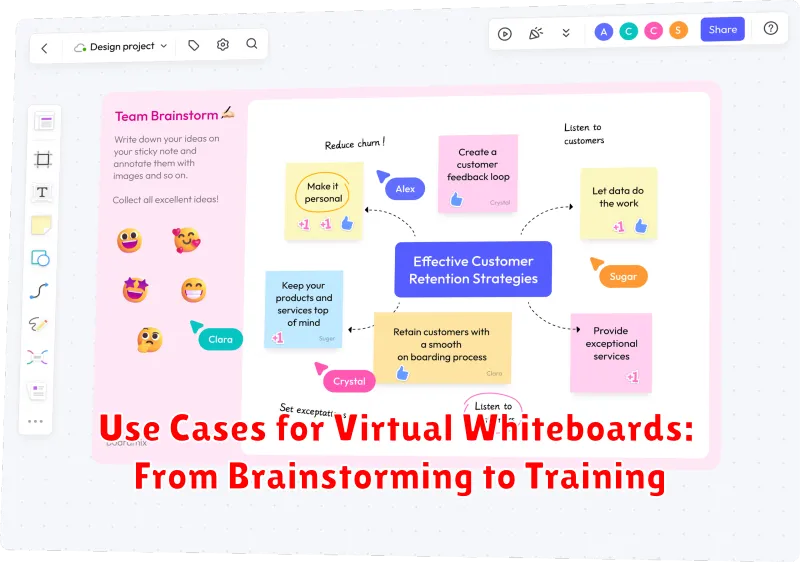
Virtual whiteboards are versatile tools applicable across various scenarios, extending beyond simple brainstorming sessions. Their adaptability makes them invaluable in modern work environments.
Brainstorming and Ideation
Facilitate dynamic brainstorming sessions where team members can contribute ideas in real-time, regardless of their physical location. The collaborative nature of virtual whiteboards fosters creativity and innovation.
Project Planning and Management
Visualize project timelines, dependencies, and tasks using virtual whiteboards. Teams can create Kanban boards, flowcharts, and mind maps to effectively plan and manage projects.
Training and Education
Deliver interactive training sessions and educational workshops. Instructors can use virtual whiteboards to explain complex concepts, annotate diagrams, and engage students in real-time.
Design Thinking and Prototyping
Support design thinking processes by providing a collaborative space for sketching, wireframing, and prototyping. Teams can iterate on design ideas collectively and efficiently.
Meetings and Presentations
Enhance virtual meetings and presentations by using virtual whiteboards to illustrate key points, gather feedback, and facilitate discussions. This makes meetings more engaging and productive.
Virtual Whiteboard vs. Physical Whiteboard: A Comparison
Virtual whiteboards and physical whiteboards both serve the purpose of visual collaboration, but they differ significantly in functionality and application. This comparison highlights the key distinctions between the two.
Accessibility and Storage
Physical whiteboards are limited by their physical location and board size. Information is typically erased, making long-term storage and sharing difficult. In contrast, virtual whiteboards are accessible from anywhere with an internet connection, and content can be saved, shared, and revisited indefinitely.
Collaboration and Features
While physical whiteboards allow for in-person collaboration, they lack the features of their virtual counterparts. Virtual whiteboards offer real-time collaboration tools, version control, and the ability to integrate multimedia elements. Multiple users can contribute simultaneously, regardless of their location.
Cost and Maintenance
The initial cost of a physical whiteboard is relatively low, but ongoing expenses like markers and erasers can add up. Virtual whiteboards typically involve subscription fees, but they eliminate the need for physical materials and offer a wider range of features, potentially leading to greater efficiency and cost savings in the long run.
Tips for Effective Collaboration on a Virtual Whiteboard
To maximize the potential of virtual whiteboards for collaborative endeavors, consider implementing the following strategies:
- Establish Clear Objectives: Before initiating a session, define the goals and desired outcomes to maintain focus and productivity.
- Designate a Facilitator: Appoint a moderator to guide the discussion, manage contributions, and ensure that all participants have an opportunity to contribute.
- Utilize Visual Cues: Employ colors, shapes, and connectors to categorize ideas, highlight relationships, and enhance visual clarity.
- Encourage Active Participation: Promote inclusivity by actively soliciting input from all team members and fostering a safe space for sharing diverse perspectives.
- Document and Share Results: Save the completed whiteboard session and distribute it to participants for future reference and ongoing alignment.
By adhering to these guidelines, teams can leverage virtual whiteboards to foster more engaging, productive, and collaborative work sessions.
Security and Privacy Considerations When Using Virtual Whiteboards

The adoption of virtual whiteboards necessitates careful consideration of security and privacy protocols. Data transmitted and stored on these platforms can be sensitive, requiring robust measures to prevent unauthorized access and data breaches.
Data Encryption
End-to-end encryption is crucial to protect data in transit and at rest. Ensure the virtual whiteboard platform utilizes strong encryption algorithms.
Access Controls
Implement role-based access control to limit access to sensitive information based on user roles and permissions. Regularly review and update access privileges.
Data Residency and Compliance
Understand where the whiteboard data is stored and whether it complies with relevant data privacy regulations such as GDPR or CCPA. Evaluate the provider’s data processing agreements.
Vendor Security Practices
Thoroughly vet the virtual whiteboard provider’s security policies and practices. Look for certifications like ISO 27001 or SOC 2 compliance.
Regular Audits
Conduct regular security audits of the virtual whiteboard platform and its integrations with other systems. Monitor for any suspicious activity or vulnerabilities.
The Future of Virtual Whiteboards: Emerging Trends
The trajectory of virtual whiteboards points towards increased sophistication and integration. Expect to see enhanced AI-powered features, such as intelligent diagramming and automated summarization, becoming commonplace.
Another trend is the convergence of virtual whiteboards with other collaboration tools. Seamless integration with video conferencing platforms, project management software, and document editing suites will streamline workflows and reduce context switching.
Furthermore, augmented reality (AR) and virtual reality (VR) technologies are poised to revolutionize the virtual whiteboard experience. Imagine sketching ideas in a shared virtual space, interacting with 3D models, and experiencing truly immersive collaboration.
Finally, as remote work becomes increasingly prevalent, expect a growing emphasis on accessibility and security. Future virtual whiteboards will prioritize cross-platform compatibility, robust encryption, and granular access controls to ensure a seamless and secure user experience.
