
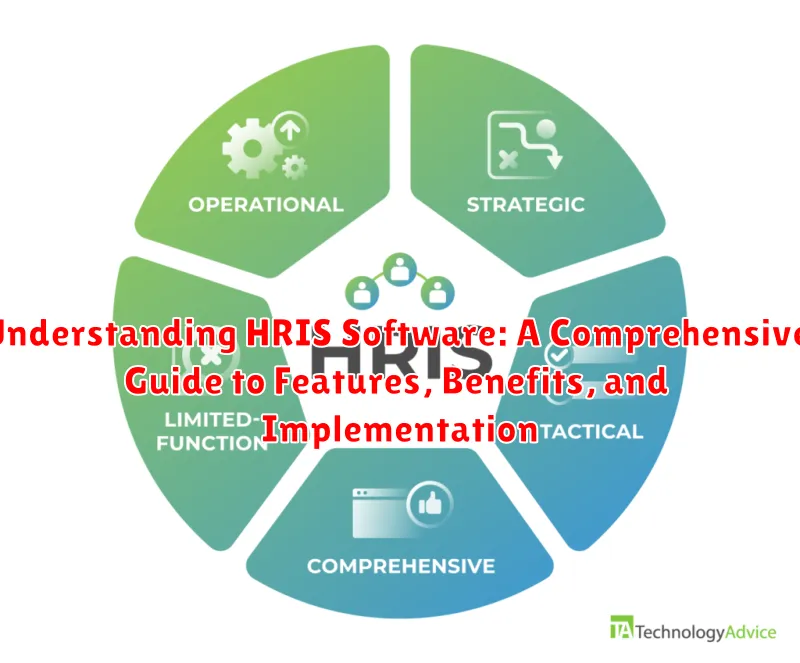
In today’s dynamic business environment, Human Resource Information Systems (HRIS) have become indispensable tools for organizations seeking to streamline their HR processes and gain a competitive edge. This comprehensive guide, “Understanding HRIS Software: A Comprehensive Guide to Features, Benefits, and Implementation,” aims to demystify HRIS software, offering a detailed exploration of its core functionalities, the strategic advantages it delivers, and the critical steps involved in successful implementation. Whether you’re a seasoned HR professional or a business leader exploring technology solutions, this resource will provide valuable insights into harnessing the power of HRIS systems.
This guide will take you through a thorough examination of HRIS software. It covers essential features such as payroll management, benefits administration, talent acquisition, performance management, and employee self-service portals. Further, it delves into the significant benefits of HRIS, including increased efficiency, improved data accuracy, enhanced employee engagement, and better strategic decision-making. Ultimately, we will provide a practical framework for implementing an HRIS system effectively, covering crucial aspects like needs assessment, vendor selection, data migration, user training, and ongoing support, ensuring a smooth and successful transition for your organization.
What is HRIS Software and How Does it Work?
HRIS stands for Human Resources Information System. It is a software solution designed to streamline and automate various HR functions within an organization. Essentially, it acts as a centralized repository for employee data and HR-related processes.
At its core, an HRIS manages employee information such as:
- Personal details (name, address, contact information)
- Employment history (start date, job title, salary)
- Benefits and compensation data
- Performance reviews
- Training records
How it works: An HRIS utilizes a database to store and organize this information. Users (HR staff, managers, employees) can access and update data through a secure interface. The system automates workflows like payroll processing, benefits enrollment, and performance management. Furthermore, HRIS software often includes reporting capabilities, allowing organizations to track key HR metrics and make data-driven decisions.
Key Features and Modules of an HRIS System
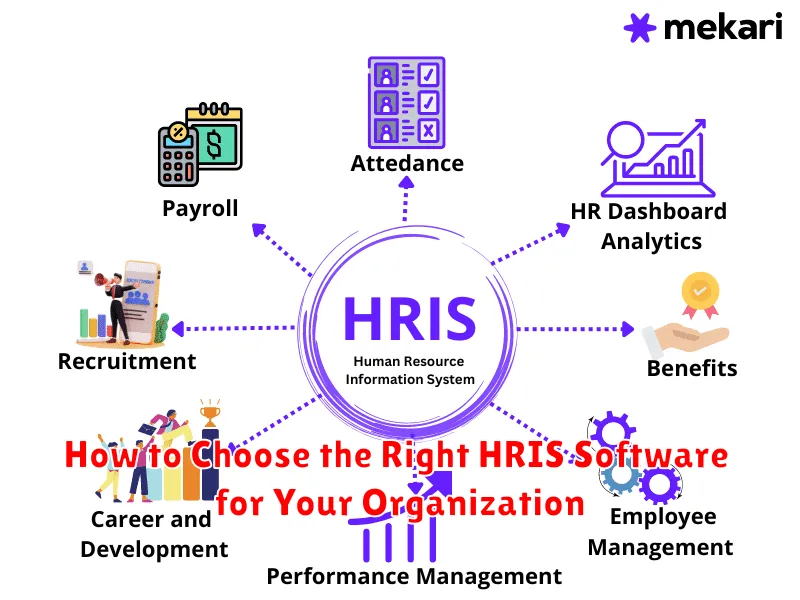
An HRIS is composed of various features and modules that streamline human resources processes. These modules are designed to work together to provide a comprehensive solution for managing employee data and related activities.
Core HR Functions
This module serves as the central database for all employee information, including personal details, job history, compensation, and benefits. Core HR ensures data accuracy and facilitates reporting.
Payroll Management
The payroll module automates the calculation and distribution of employee salaries, wages, and deductions. It also handles tax compliance and reporting.
Benefits Administration
This module allows employees to enroll in and manage their benefits packages, such as health insurance, retirement plans, and paid time off. It simplifies the benefits enrollment process for both employees and administrators.
Time and Attendance Tracking
Time and attendance modules track employee work hours, attendance records, and leave requests. This data is essential for accurate payroll processing and workforce management.
Recruiting and Onboarding
These modules streamline the hiring process, from job postings to applicant tracking and onboarding new hires. Recruiting modules often integrate with job boards and social media platforms.
Benefits of Implementing HRIS Software for Your Business
Implementing HRIS software offers numerous benefits for businesses of all sizes. These advantages span across efficiency, accuracy, and strategic decision-making.
Enhanced Efficiency and Productivity
Automation of routine HR tasks, such as payroll processing and benefits administration, significantly reduces manual effort and saves time. This allows HR staff to focus on more strategic initiatives.
Improved Accuracy and Compliance
An HRIS minimizes errors associated with manual data entry, ensuring accurate employee records and compliance with labor laws and regulations. Automated reporting features further support compliance efforts.
Data-Driven Decision Making
With centralized employee data and advanced reporting capabilities, HRIS software provides valuable insights for informed decision-making related to workforce planning, talent management, and performance management.
Improved Employee Experience
Self-service portals empower employees to access their personal information, request time off, and update their profiles independently, leading to increased employee satisfaction and engagement.
HRIS Software Deployment Options: Cloud vs. On-Premise
Selecting the right HRIS deployment method is crucial for aligning with your organization’s IT infrastructure, budget, and long-term goals. The two primary deployment options are cloud-based and on-premise.
Cloud-Based HRIS
Cloud HRIS, also known as Software-as-a-Service (SaaS) HRIS, is hosted on the vendor’s servers and accessed via the internet. This option typically involves subscription-based pricing and offers advantages like reduced upfront costs, easier scalability, automatic updates, and remote accessibility.
On-Premise HRIS
On-premise HRIS requires the organization to host the software on its own servers. This model involves a higher initial investment in hardware and software licenses. Benefits include greater control over data security and customization options but necessitates dedicated IT resources for maintenance and updates.
The optimal choice depends on your organization’s specific needs, technical capabilities, and risk tolerance. Consider factors such as data security requirements, budget constraints, and the level of IT support available when making your decision.
How to Choose the Right HRIS Software for Your Organization
Selecting the appropriate HRIS software is crucial for optimizing human resource management. Begin by defining your organization’s specific needs and goals. Conduct a thorough assessment of your current HR processes and identify areas where an HRIS can provide significant improvements.
Key Considerations:
- Scalability: Ensure the software can accommodate your company’s future growth.
- Features: Prioritize essential modules such as payroll, benefits administration, and talent management.
- Integration: Verify seamless integration with existing business systems, like accounting or CRM software.
- User-Friendliness: Opt for an intuitive interface that minimizes training requirements and maximizes user adoption.
- Vendor Support: Evaluate the vendor’s reputation, customer support, and implementation assistance.
- Budget: Establish a clear budget and consider both upfront costs and ongoing maintenance fees.
Request demos from multiple vendors and conduct a pilot program with a small group of employees to evaluate the software’s functionality and suitability. Carefully review user reviews and case studies to gain insights into real-world experiences with the software. This comprehensive approach will enable you to make an informed decision and select the HRIS solution that best aligns with your organizational requirements.
Integrating HRIS with Other Business Systems
Effective integration of an HRIS with other business systems is crucial for streamlined operations and data consistency. This integration eliminates data silos and promotes seamless data flow across departments.
Benefits of Integration
- Enhanced Data Accuracy: Reduces manual data entry and errors.
- Improved Efficiency: Automates data transfer between systems.
- Better Decision-Making: Provides a unified view of employee data.
Common Integrations
HRIS systems are commonly integrated with the following:
- Payroll Systems: Automates payroll processing and tax reporting.
- Accounting Software: Facilitates accurate financial reporting.
- Time and Attendance Systems: Tracks employee hours and attendance.
- Performance Management Systems: Aligns employee performance with business goals.
- Recruiting Software (ATS): Streamlines the hiring process.
Considerations for Integration
Before integrating an HRIS, consider data compatibility, security protocols, and the integration capabilities of the respective systems. A well-planned integration strategy is essential for success.
The Future of HRIS: Trends and Innovations
The field of Human Resources Information Systems (HRIS) is rapidly evolving, driven by technological advancements and changing workplace dynamics. Understanding these trends is crucial for businesses seeking to optimize their HR operations.
Key trends shaping the future of HRIS include:
- Artificial Intelligence (AI) and Machine Learning (ML): AI-powered HRIS solutions are automating tasks like recruitment, performance management, and employee engagement analysis.
- Enhanced Data Analytics: HRIS platforms are providing more sophisticated data analytics capabilities, enabling data-driven decision-making in areas like workforce planning and talent management.
- Mobile-First Design: Recognizing the increasing prevalence of mobile devices, HRIS vendors are prioritizing mobile-friendly interfaces and functionalities.
- Employee Experience (EX) Focus: Future HRIS will prioritize employee experience with personalized interfaces, self-service tools, and features promoting well-being.
- Cloud-Based Solutions: Cloud deployment will continue to be the dominant model, offering scalability, accessibility, and cost-effectiveness.
These innovations are transforming HR from a purely administrative function into a strategic driver of organizational success.
Common Challenges in HRIS Implementation and How to Overcome Them

Implementing an HRIS can present several challenges. A primary hurdle is data migration. Transferring existing employee data accurately and securely requires meticulous planning. To overcome this, conduct thorough data audits, cleanse outdated or inaccurate information, and utilize data migration tools.
Another common challenge is user adoption. Employees may resist learning a new system. Mitigate this by providing comprehensive training programs, creating user-friendly guides, and designating HRIS champions within departments to assist colleagues.
Integration issues with existing systems can also arise. Ensure that the HRIS vendor offers robust integration capabilities and conduct thorough testing before launch. Define clear integration requirements and involve IT early in the process. Finally, budget overruns can derail implementation. Create a detailed budget that includes all potential costs, such as software licenses, implementation services, and training. Obtain quotes from multiple vendors and factor in a contingency fund.
HRIS Software Pricing and ROI Considerations
Understanding the pricing structure of HRIS software is crucial for budget planning. Costs can vary significantly based on factors like the number of employees, modules selected, and deployment method (cloud vs. on-premise). Common pricing models include per-employee per-month (PEPM), tiered pricing, and one-time license fees.
Calculating the Return on Investment (ROI) of HRIS software involves assessing both tangible and intangible benefits. Tangible benefits include reduced administrative costs, improved payroll accuracy, and decreased compliance risks. Intangible benefits, such as enhanced employee engagement and better data-driven decision-making, should also be considered.
To determine ROI, compare the total cost of the HRIS software (including implementation, training, and maintenance) with the anticipated savings and benefits over a specific period. This analysis helps justify the investment and ensures that the chosen HRIS solution aligns with the organization’s financial goals.
