

In today’s competitive digital landscape, user engagement and retention are paramount for the success of any application. However, many users struggle to fully utilize the features and benefits offered by software, leading to frustration and ultimately, churn. This is where in-app guidance becomes essential. In-app guidance, a strategic approach to user onboarding and continuous user support, is designed to proactively guide users through an application, maximizing their understanding and driving product adoption. Effective in-app guidance can significantly improve the user experience, leading to increased satisfaction, loyalty, and ultimately, a higher return on investment.
This comprehensive overview, “Unlocking User Potential: A Comprehensive Overview of In-App Guidance,” will delve into the core principles of in-app guidance, exploring various techniques and best practices for implementation. We will examine the benefits of providing timely and relevant support within the application itself, covering topics such as interactive tutorials, contextual help, and proactive messaging. Furthermore, we’ll discuss how to effectively measure the impact of in-app guidance on key metrics such as user activation, feature discovery, and overall customer lifetime value. By understanding and implementing these strategies, businesses can empower their users to unlock the full potential of their applications.
What is In-App Guidance and Why Does it Matter?
In-app guidance refers to providing contextual help and support to users directly within a software application or platform. This can take many forms, including tooltips, walkthroughs, onboarding flows, and contextual help menus.
Defining In-App Guidance
At its core, in-app guidance aims to proactively assist users as they navigate an application. It anticipates user needs and provides relevant information or instructions at the precise moment they are needed.
The Significance of In-App Guidance
In-app guidance is crucial for several reasons:
- Improved User Adoption: Helps new users quickly understand and utilize the software’s features.
- Enhanced User Experience: Reduces user frustration and increases satisfaction by providing readily available support.
- Reduced Support Costs: Decreases the reliance on traditional support channels by addressing common user questions within the application.
- Increased Feature Discovery: Guides users to discover and utilize less-known but valuable features, maximizing the software’s potential.
Ultimately, implementing effective in-app guidance can significantly contribute to increased user engagement, retention, and overall success with the product.
Key Benefits of Implementing In-App Guidance
Implementing in-app guidance offers numerous advantages for both users and businesses. One of the most significant benefits is improved user onboarding. By providing contextual help and instructions within the application itself, users can quickly understand its features and functionality, leading to faster adoption and reduced churn.
Another key advantage is increased user engagement. In-app guidance can proactively prompt users to explore new features or provide tips on how to optimize their workflow. This can lead to a more active and satisfied user base.
Furthermore, in-app guidance contributes to a reduction in support costs. By addressing common user queries and providing self-service assistance within the app, businesses can minimize the need for extensive customer support resources.
Here’s a brief overview:
- Improved User Onboarding
- Increased User Engagement
- Reduced Support Costs
- Enhanced Feature Adoption
- Better User Experience
Different Types of In-App Guidance: Tooltips, Walkthroughs, and More
In-app guidance encompasses a variety of methods designed to assist users within a software application. Understanding the nuances of each type allows for a more strategic and effective implementation.
Common Types of In-App Guidance
- Tooltips: Brief, contextual hints that appear when a user hovers over or interacts with a specific element. They provide immediate, targeted information.
- Walkthroughs: Step-by-step guides that lead users through a particular process or feature. They are ideal for onboarding and explaining complex workflows.
- Hotspots: Subtle visual cues that draw attention to important or newly introduced features.
- Beacons: Similar to hotspots, but often animated to further capture user attention.
- Progress Bars: Visual indicators showing a user’s progress within a process, encouraging completion.
- Checklists: Lists of tasks that users need to complete, often used for onboarding or feature adoption.
The best type of in-app guidance depends on the specific user need and the context within the application. Combining different types can create a comprehensive and user-friendly experience.
Designing Effective In-App Guidance: Best Practices for User Engagement
Crafting effective in-app guidance requires a user-centric approach. Begin by identifying specific user needs and pain points within your application. This understanding will inform the design and delivery of your guidance.
Keep it concise and relevant. Avoid overwhelming users with excessive information. Guidance should be short, sweet, and directly related to the current context. Use clear and simple language, avoiding technical jargon.
Personalize the experience. Tailor guidance based on user roles, behavior, and progress. Segmenting your user base allows for more targeted and effective assistance.
Consider the placement and timing of your guidance. Ensure it’s easily accessible but doesn’t obstruct the user’s workflow. Trigger guidance based on specific actions or events.
A/B test your in-app guidance to optimize performance. Experiment with different messaging, formats, and triggers to determine what resonates best with your users.
Ensure that the design of your in-app guidance aligns with your application’s overall aesthetic. This creates a cohesive and professional user experience.
How to Measure the Success of Your In-App Guidance Strategy
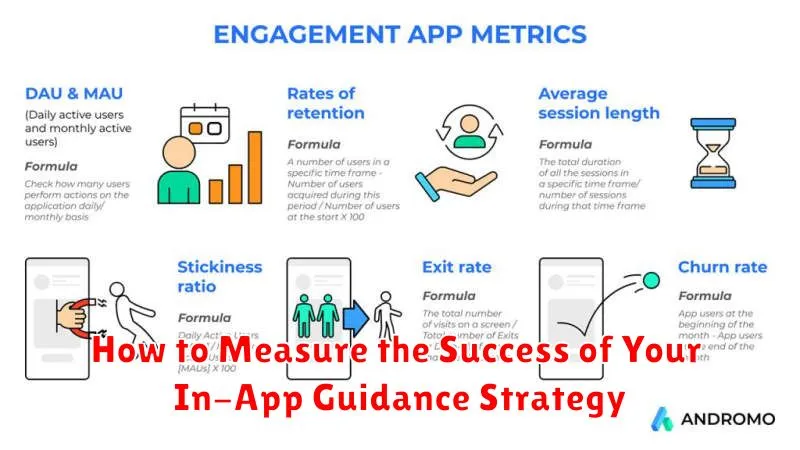
Measuring the success of your in-app guidance strategy is crucial for understanding its impact on user behavior and achieving your desired outcomes. By tracking key metrics, you can gain insights into what’s working, what’s not, and how to optimize your guidance for maximum effectiveness.
Key Metrics to Track
- Completion Rate: The percentage of users who complete a walkthrough or tutorial.
- Feature Adoption Rate: How many users are actively using the features highlighted by your guidance?
- Time to Value: How quickly users achieve their desired outcomes after interacting with the guidance.
- User Engagement: Track metrics like session length, active users, and frequency of use.
- Support Ticket Reduction: Has the guidance led to a decrease in the number of support requests related to specific features?
Regularly analyze these metrics to identify areas for improvement. A/B testing different approaches can further refine your strategy and ensure you’re delivering the most effective in-app guidance.
Integrating In-App Guidance with Your Existing Tech Stack
Seamless integration of in-app guidance with your current tech stack is crucial for maximizing its effectiveness. This involves ensuring compatibility with your existing CRM, analytics platforms, and user onboarding tools. A well-integrated system allows for personalized and context-aware guidance, enhancing the user experience.
Consider these key aspects:
- API Compatibility: Verify that the in-app guidance solution offers robust APIs for easy communication with your existing systems.
- Data Synchronization: Ensure data flows seamlessly between platforms to provide relevant and up-to-date guidance.
- Single Sign-On (SSO): Implement SSO for a unified and secure user experience.
- Analytics Integration: Connect your in-app guidance platform with your analytics tools to track performance and identify areas for improvement.
By carefully planning and executing the integration process, you can unlock the full potential of in-app guidance and create a more engaging and productive user experience.
The Future of In-App Guidance: Trends and Innovations
The realm of in-app guidance is continuously evolving, driven by advancements in technology and a growing emphasis on user experience. Several key trends are shaping its future trajectory.
Personalization will become increasingly sophisticated. Expect to see more AI-powered systems that tailor guidance based on individual user behavior, preferences, and skill levels. This will move beyond simple segmentation to offer truly customized experiences.
Integration with emerging technologies like augmented reality (AR) and virtual reality (VR) will open new avenues for interactive and immersive guidance. Imagine tutorials that overlay instructions directly onto the user’s real-world view or provide simulated environments for practicing complex tasks.
Proactive assistance, where the application anticipates user needs and offers guidance before they even encounter a problem, will become more prevalent. This requires advanced analytics and a deep understanding of user workflows.
Improved analytics will allow for more precise measurement of in-app guidance effectiveness. Expect to see more granular data on user engagement, completion rates, and the impact of guidance on key performance indicators (KPIs).
Common Mistakes to Avoid When Implementing In-App Guidance
While in-app guidance can significantly enhance user experience and adoption, several common pitfalls can undermine its effectiveness. Avoiding these mistakes is crucial for maximizing the return on investment.
Overwhelming Users with Too Much Information
A common mistake is bombarding users with excessive guidance. This can lead to information overload and frustration. Keep guidance concise and focused on the most critical tasks.
Poor Timing and Irrelevance
Delivering guidance at inappropriate times or when it’s irrelevant to the user’s current activity can be disruptive. Ensure guidance is contextually relevant and triggered by user actions.
Neglecting User Segmentation
Treating all users the same ignores varying skill levels and needs. Segment users and tailor guidance to their specific profiles and usage patterns.
Ignoring Analytics and Feedback
Failing to track the performance of in-app guidance and solicit user feedback prevents optimization. Monitor key metrics and actively seek user input to refine your guidance strategy.
Intrusive and Disruptive Design
Guidance that is visually intrusive or interferes with the user’s workflow can be counterproductive. Prioritize a seamless and non-disruptive design that complements the user interface.
Examples of Successful In-App Guidance Implementations
Many companies have successfully implemented in-app guidance to improve user onboarding, feature adoption, and overall user experience. These examples demonstrate the tangible benefits of a well-designed strategy.
Dropbox: Streamlined Onboarding
Dropbox utilizes interactive walkthroughs to guide new users through the process of uploading and sharing files. This reduces initial friction and encourages users to immediately experience the core value proposition of the product.
Salesforce: Enhanced Feature Discovery
Salesforce employs tooltips and contextual help to highlight new or underutilized features within its complex platform. This allows users to discover functionalities they might otherwise miss, leading to increased platform engagement and feature adoption.
Asana: Improved Project Management Workflow
Asana uses proactive prompts and task-specific guidance to help users navigate project management workflows effectively. By offering support at critical moments, Asana reduces user frustration and helps them achieve their goals more efficiently.
These implementations highlight the diverse ways in-app guidance can be used to drive positive user outcomes.
